To remove your listing photos from Zillow after a sale, you need to claim your home as the owner on Zillow's owner dashboard, then submit a photo-removal request through their Help Center. Zillow typically processes these within a few business days, but the photos do not disappear automatically when a home sells — you have to ask. The same is true for Redfin: log in, find your property, and use the "Edit Home Facts" or contact-support path to flag the photos for removal.
We've helped a lot of sellers through this in Eugene — in the River Road corridor, up in the Southwest Hills , and across Lane County. The closing table is a relief. What catches people off guard is finding out their floor plan and interior photos are still sitting on Zillow months — sometimes years — after the keys changed hands.
Here is the short version of what you can do, platform by platform.
Removing Photos From Zillow
Zillow stores listing data on tens of millions of homes, including properties that sold years ago. Photos are not automatically removed at closing. To request removal:
Response times vary. If you don't hear back within a week, follow up through the Help Center ticket. Persistence matters here — Zillow's automated systems are not designed with seller privacy as the default.
- Go to Zillow.com and search for your home's address.
- Click "Claim this home" if you haven't already — this gives you owner-level access.
- Once claimed, navigate to your owner dashboard and look for the photo management section.
- If the self-serve option doesn't surface a removal button, go to Zillow's Help Center and submit a request directly, citing privacy concerns. Reference your closing date.
- Zillow's policy allows homeowners to request removal of interior photos after a sale. They do not always act on it without a direct request.
Removing Photos From Redfin
Redfin pulls listing data from the MLS and stores it independently. After your home sells, the photos remain in Redfin's database unless you request removal. The path:
- Search your address on Redfin and find the sold listing page.
- Use the "Edit Home Facts" link if it appears, or scroll to the bottom of the page and use the contact/feedback form to flag the photos.
- In your message, state clearly that you are the former owner, the home has sold, and you are requesting removal of interior photos and floor plan data for privacy reasons.
- Redfin's support team typically responds within a few business days.
What About Google?
Google indexes listing pages from Zillow, Redfin, and other portals — so even after you get photos removed from those platforms, cached versions can linger in Google's index for weeks. Once the source page is updated or taken down, you can submit a removal request through Google Search Console's "Remove Outdated Content" tool. This accelerates the cache clearing. You don't need a Search Console account tied to those domains — the outdated-content tool is open to anyone.
If you're still seeing your home's interior photos surface in Google image search after the source pages have been updated, that's the cache lag. It usually resolves within two to four weeks without any additional action on your part.
Questions about the process? Our team at Heart & Home Real Estate has walked Lane County sellers through this more times than we can count. We're glad to help if you have questions about the process.
Are Criminals Really Using Zillow to Plan Burglaries?
We know — that sounds like something from a true crime podcast. But it's real, and police have said so themselves.
When officers in Riverside, California arrested a group of burglary suspects, they went through their phones. They didn't just find the usual stuff. They found Zillow search histories. Redfin browsing. Specific home addresses, looked up in detail — room layouts, doors, windows — all checked out from home before the suspects ever drove near the property.
A former New York City police detective put it plainly: someone planning a break-in today can learn more about your home from a laptop than from sitting outside watching it for days. That's not an exaggeration. Listing photos show things you can't see from the street.
And here's the thing that catches most people off guard — Zillow stores information on over 160 million homes. A lot of those are homes that sold years ago. The photos are still up. The floor plans are still up. All free. No password needed.
What Your Listing Is Actually Showing the World
When sellers think about their listing photos, they're thinking about what buyers will like — good lighting, clean counters, a nice front yard shot. Totally fair. But those same photos are telling a different story to someone looking for the wrong reasons.
What Strangers Can Learn From Your Listing Photos
Here's what shows up in a typical home listing that most people never think twice about:
- Whether anyone is home — a perfectly staged house with no personal items anywhere? That tells people the sellers have already left
- Your floor plan — where the rooms are, how the hallways connect, where the main bedroom sits
- Every way in and out — the front door, back door, garage door, sliding doors
- Your windows — which ones open, which face the street, which side of the house gets less foot traffic
- Where your cameras are — this one surprises people. If you put cameras up to stay safe, those camera locations show up in exterior shots. Someone looking carefully now knows exactly where to go to avoid them
- Signs of a dog — or no dog. A food bowl, a dog door, a crate — or the absence of all three
- Your backyard — the fence, the gate, whether there's an alley out back
Why 3D Tours Are the Riskiest Thing on Your Listing
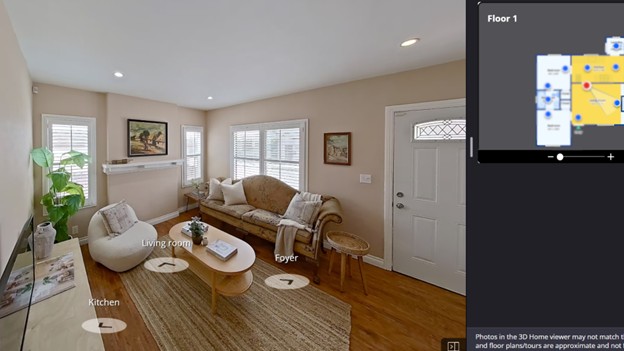
Some listings include a full walkthrough tour — the kind where you click around and move through every room like a video game. Those are one of the bigger privacy concerns on a listing. Viewers can explore detailed layouts online and walk through your entire house — every room, every corner — without ever pulling into your driveway. And most of the time, those tours stay online long after the sale is done and everyone has moved on.
For most homeowners, this is simply about awareness and a few quick adjustments — not a reason for concern.
What Police Say About Listing Photos and Burglaries
These aren't what-ifs.
In Riverside, California, police say detectives have found Zillow and Redfin searches of specific addresses on the phones of people arrested for burglary, and they advise homeowners to take interior photos down from those sites.
On top of listing sites, people also use Google Street View to check out the outside of a home — the driveway, the side yard, the back fence. Some people even use drones now. It sounds extreme until it happens to someone you know.
Why This Matters More in Eugene and Lane County
By FBI figures, Oregon's property crime rate ran about a third above the national rate in 2023, and Eugene had 853 burglaries reported in 2024.
The numbers have moved in a better direction in recent years, which is worth noting. But a drop in the numbers doesn't take your old listing photos offline. Those are still there, still searchable, still showing whoever wants to look exactly what your home looks like inside.
We've talked to several sellers in Lane County who had no idea their old listing photos were still live. An empty house, fully photographed inside and out, can sit on the internet the whole time.
Nobody mentions that part when you sign a listing agreement.
Signs Your Listing Might Be Putting You at Risk
You don't have to overthink this. Just take a quick look at your current or old listing and see how many of these apply:
Two or more? Worth taking 10 minutes today to sort it out.
| What to Check | Why It's a Problem |
|---|---|
| Home was empty before or after listing | Empty homes are much easier to target |
| Listing has been live for more than a month | More time online means more people have seen it |
| A walkthrough tour is still live on the listing | Anyone can explore your floor plan from anywhere |
| Camera locations are visible in the photos | Shows where the gaps in coverage are |
| The side yard or back gate shows up in exterior shots | Gives a clear picture of how to get in and out |
| The showing schedule was posted publicly | Told the world when the house was going to be empty |
| The home sold a while ago but the photos are still there | The most common situation — and the one least people fix |
How to Remove Your Home From Zillow, Redfin, and Google (Step-by-Step)
No complicated steps here. If you can log into an email account, you can do all of this.
How to Remove Your Home From Zillow (4 Minutes)
If the claim process gives you trouble, go to zillow.zendesk.com/hc/en-us/requests/new and put in a support request. They do get back to you.
- Go to zillow.com and sign in — or make a free account if you need one
- Click your profile picture in the top right → "Your Home"
- Type in your address → click "Claim This Home"
- Answer a few questions to confirm you own the property
- Once you're in, go to "Edit Home Facts"
- Go through your photos one at a time → click Hide or Delete on each one
- Hit Save
How to Remove Your Home From Redfin (2 Minutes)
- Sign into redfin.com
- Click your name in the top right → "Owner Dashboard"
- Find your home
- Click "Edit Photos" → "Hide Listing Photos"
- Confirm → Save
How to Remove Your Home From Realtor.com (2 Minutes)
- Go to realtor.com/myhome
- Search your address and confirm you're the owner
- Go to the "My Home" tab → click "Remove Photos"
- Hit "Yes, Remove All Photos"
How to Blur Your Home on Google Street View (2 Minutes — and It Stays That Way)
Once Google blurs your home, that's permanent. It won't come back. Most people skip this step, and it is worth doing.
- Open Google Maps on a computer — easier than on your phone
- Search your home address → click into Street View
- Bottom right of the screen → click "Report a Problem"
- Move the red box over your house
- Choose "My Home" under the blurring options
- Write a short note → click Submit
How to Fix the Real Source of the Problem — the MLS
Here's what most articles about this topic never mention: Zillow, Redfin, and Realtor.com don't create your listing. They pull it from the MLS — the listing database your agent used when your home first went on the market.
If your photos are still in that database, these sites will keep showing them no matter what you do on their end.
Just call or text your original listing agent and ask: "Can you pull my photos from the old MLS record?" That's it. One conversation fixes the problem at the source. Most agents can take care of it quickly.
How to Get Your Personal Info Off People-Search Websites
Some people start their research even before Zillow — on sites like Spokeo, WhitePages, or BeenVerified, which let anyone look up a name and get a home address.
Each of those sites has an opt-out page. Search the site name plus "opt out" and follow the steps — usually takes about 5 minutes each. If you'd rather handle it all at once, services like DeleteMe can do it across dozens of these sites for a small yearly fee.
Still Selling? Here's How to Keep Your Home Safe While It's Listed
Taking your listing down isn't always the answer, especially if you're actively trying to sell. You shouldn't have to choose between selling and staying safe. Here's how to do both.
What to Do Before Every Showing
- Put away medications, jewelry, personal documents, and anything small and valuable — these are the things that most commonly go missing during showings, according to the National Association of Realtors
- Switch to a smart lockbox that tracks every entry with a time and agent record
- If your door keypad has worn-down buttons from regular use, cover it during showings — worn keys make the code easier to guess than most people realize
Security Tips for Eugene Sellers During the Listing Period
- Put security cameras at your entry points — but double-check that they don't show up in your listing photos
- Put your mail and packages on hold while the listing is live. A full mailbox is one of the easiest ways for someone to tell a house is unoccupied
- Give a neighbor a heads-up that your home is listed and ask them to let you know if they notice any cars that don't seem to belong
- Keep your alarm set and connected to your phone so you get a notification during any showing window
Open House Tips for Lane County Sellers
- Have every visitor write down their name and phone number before they come in — buyers won't mind, and it gives you a record
- Your agent should stay alongside visitors as they walk through, not ahead of them — no one should wander off into a room alone
- After every open house, walk through together and check every window latch, every door, every exterior gate
Your 10-Minute Checklist — Do This Today

Bookmark this page. Come back to it tonight after dinner. It takes about 10 minutes:
Five websites and one phone call. That's all it takes to close the doors that are most commonly left open.
- Zillow — claim your home, remove all photos
- Redfin — Owner Dashboard, hide all listing photos
- Realtor.com — My Home tab, remove all photos
- Google Maps — Street View, report a problem, blur your home permanently
- Call your listing agent — ask them to pull photos from the MLS
- Spokeo and WhitePages — search your name, submit the opt-out forms
If you're getting ready to sell in Eugene or anywhere in Lane County, we're glad to talk before your listing goes live. We go through a full privacy and security walkthrough with every seller we work with — because keeping your home safe doesn't stop the moment it hits the market.
Heart and Home Real Estate works with buyers and sellers all across Eugene, Springfield, and the surrounding Lane County area. We're local, we've been doing this a long time, and we genuinely care about the people we work with.
Common questions
- Can people still see my Zillow listing after I sell my home?
- Yes. Closing ends the sale, not the record — listing photos normally stay up afterwards, and nobody takes them down for you. You have to claim the property as the owner and hide or delete the photos yourself. Zillow, Redfin and Realtor.com each have their own steps.
- How do I delete house photos from Zillow?
- Claim your home on the Zillow owner dashboard, open the photo section, and delete the images you do not want shown. It takes about four minutes. Deleting them on Zillow does not delete them anywhere else — Redfin and Realtor.com each hold their own copy and need the same treatment.
- How long does it take Zillow to remove listing photos?
- Saved changes usually appear on Zillow within one to three days. Other sites refresh on their own schedule and can take longer.
- Why does Zillow still have photos of my house?
- Because the photos did not come from Zillow. They came from the MLS, and every site that shows your home received a copy. Taking them down site by site works, but the permanent fix is at the source — ask the original listing agent to remove the images from the MLS record.
- Will removing photos hurt my home if it is still for sale?
- Usually not, but speak to your agent before you do it. If the home is actively listed, pulling photos in the middle of marketing can cost you showings.
- Is Google Street View blurring permanent?
- Yes. Google treats an approved blur as permanent and will not undo it, so check the area you have selected carefully before you submit the request.